
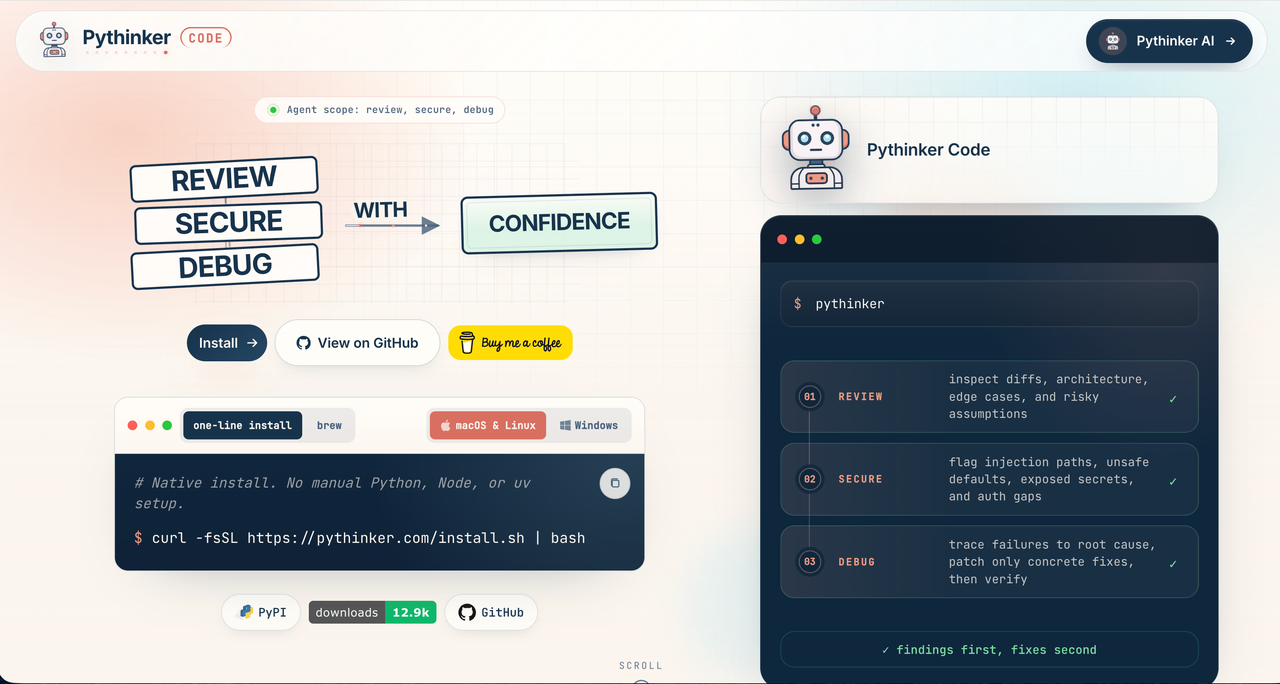
Most AI coding tools rush straight into generation. They read a prompt, produce code, and leave the developer to figure out whether the result is secure, maintainable, or even connected to the real problem.
Pythinker Code takes a different approach: think first, then code.
Pythinker Code is an open-source, terminal-native AI engineering agent built around a review-first workflow. It does not simply jump into file edits. It reads your repository, audits your code, investigates failures, scans for security risks, and only then writes scoped fixes based on the analysis. Its GitHub README describes it as a “review-first AI engineering agent” for the terminal, combining code review, vulnerability scanning, root-cause debugging, and code creation in one shell-native loop. (GitHub)
For developers who already live in the command line, this matters. Pythinker Code is designed to keep the entire engineering workflow close to the repo, close to the shell, and close to the evidence.
What Is Pythinker Code?
Pythinker Code is an AI engineering agent for developers who want analysis before automation.
Instead of acting like a simple chatbot that generates code on request, Pythinker Code works more like an engineering partner inside your terminal. It can review diffs, scan for vulnerabilities, diagnose bugs, and then implement changes after it has enough context to understand the problem. (GitHub)
Its workflow is built around four practical engineering roles:
Code reviewer — reviews changes and gives critique before implementation.
Security reviewer — looks for validated vulnerability findings.
Debugger — investigates failures and root causes.
Coder / implementer — makes scoped code edits after the review and diagnosis phase. (GitHub)
That makes Pythinker Code especially useful for developers, indie hackers, technical founders, and engineering teams who want AI assistance without losing control of quality.
Why “Review First” Is Better Than “Generate First”
A lot of AI coding assistants are optimized for speed. That can be useful, but speed without review can create hidden technical debt.
Pythinker Code focuses on a safer loop:
Review → Secure → Diagnose → Create
This is the core marketing message. It positions Pythinker Code as more than another AI code generator. It is a tool for developers who care about reasoning, security, and maintainability.
The repo explains that Pythinker reads your code before writing changes, auditing diffs, scanning for vulnerabilities, and root-causing failures before editing files. (GitHub)
That makes it a strong fit for workflows where correctness matters, including:
debugging production issues
reviewing pull requests
refactoring legacy code
investigating security concerns
working across large repositories
preparing code before deployment
Built for the Terminal
Pythinker Code is terminal-first. Developers can plan, edit, run, and verify work without leaving the shell. The project describes every action as visible, scriptable, and auditable, which is important for engineers who want transparency in their AI workflow. (GitHub)
This is one of the product’s strongest differentiators.
Many AI development tools pull users into a separate chat window or IDE sidebar. Pythinker Code stays where many engineers already work: the command line.
That means less context switching, less copy-pasting, and fewer disconnected conversations about code.
Key Features of Pythinker Code
1. AI Code Review Before Code Generation
Pythinker Code is designed to inspect code before modifying it. This helps developers catch problems earlier and avoid blindly accepting generated changes.
2. Security and Vulnerability Scanning
The project positions security review as a first-class part of the workflow, not an afterthought. It includes a security-focused subagent for vulnerability findings. (GitHub)
3. Root-Cause Debugging
Instead of only patching symptoms, Pythinker Code can investigate failures and diagnose the underlying issue before implementation.
4. Shell Command Mode
Pythinker Code includes a shell command mode. Developers can press Ctrl-X to run direct shell commands inside the agent, then return to AI mode with context preserved. (GitHub)
5. ACP IDE Integration
Pythinker Code supports the Agent Client Protocol, allowing ACP-aware editors such as Zed and JetBrains to use a Pythinker session inline. (GitHub)
6. MCP Tool Loading
Pythinker Code can manage stdio and HTTP MCP servers through pythinker mcp, including OAuth-backed servers, persistent config, and ad-hoc files. (GitHub)
7. Subagents, Skills, Hooks, and Plugins
The project supports built-in subagents, reusable skills, prompt flows, hooks, and plugins. This makes it hackable and extensible for more advanced developer workflows. (GitHub)
8. Bring Your Own Model
Pythinker Code lets developers swap providers and models per session, including hosted Pythinker models or their own keys. (GitHub)
Privacy-Friendly by Design
Pythinker Code is not the LLM itself. According to the project README, users bring their own API key, and prompts and responses go directly between the terminal and the configured model provider. The README says Pythinker does not see, store, or forward those prompts or model responses. (GitHub)
For developers working with private repositories, internal tools, or sensitive code, this is an important trust signal.
Easy Installation Across Platforms
Pythinker Code provides several installation options. The GitHub README lists native installers for Windows, macOS, Linux, Docker, Homebrew, Scoop, Nix, system packages, and a Python fallback through pip install pythinker-code. (GitHub)
After installation, the basic flow is simple:
curl -fsSL https://pythinker.com/install.sh | bash
pythinker --version
pythinker login
pythinker
The project also supports updates through pythinker update. (GitHub)
Who Should Use Pythinker Code?
Pythinker Code is a strong fit for:
Developers who want AI inside the terminal
It keeps the workflow shell-native and avoids unnecessary switching between tools.
Engineering teams that care about review quality
The review-first design makes it useful for code review, debugging, and safer implementation.
Security-conscious developers
Security scanning is part of the core workflow rather than a separate add-on.
Open-source maintainers
Because it is open-source and Apache-2.0 licensed, developers can inspect, extend, and integrate it into their own workflows. (GitHub)
AI power users
With MCP, ACP, plugins, hooks, skills, and model flexibility, Pythinker Code is built for developers who want more than a basic AI chat assistant.
Pythinker Code vs. Traditional AI Coding Assistants
Traditional AI coding assistants often start with generation. Pythinker Code starts with understanding.
That difference is the product’s core advantage.
Traditional AI Coding Assistant | Pythinker Code |
|---|---|
Generates code quickly | Reviews and diagnoses before writing |
Often works in a chat or IDE panel | Runs terminal-first |
May require manual context sharing | Reads the repo directly |
Focuses mainly on code output | Combines review, security, debugging, and implementation |
Can feel like a black box | Emphasizes visible, auditable actions |
Pythinker Code is not just trying to help developers write more code. It is trying to help developers write better, safer, more grounded code.
Final Takeaway
Pythinker Code is built for developers who do not want AI to blindly generate code. They want AI to inspect, reason, review, debug, and then implement.
That is the power of the review-first approach.
With terminal-native workflows, security scanning, root-cause debugging, ACP and MCP support, subagents, skills, hooks, plugins, and bring-your-own-model flexibility, Pythinker Code gives engineers a serious AI coding workflow without forcing them out of the shell.
Think first. Then code. That is Pythinker Code.
Discussion
Responses
No comments yet. Be the first to add one.